Model Context Protocol (MCP)
model – LLM
context – extra, external information
protocol – rules
The context window of an LLM is limited, and LLMs are trained on vast datasets, typically only once a week or day, so they are not always up to date. MCP is a way to provide context to an LLM efficiently. It offers a standardized method to connect AI models to data sources and tools.
General Architecture
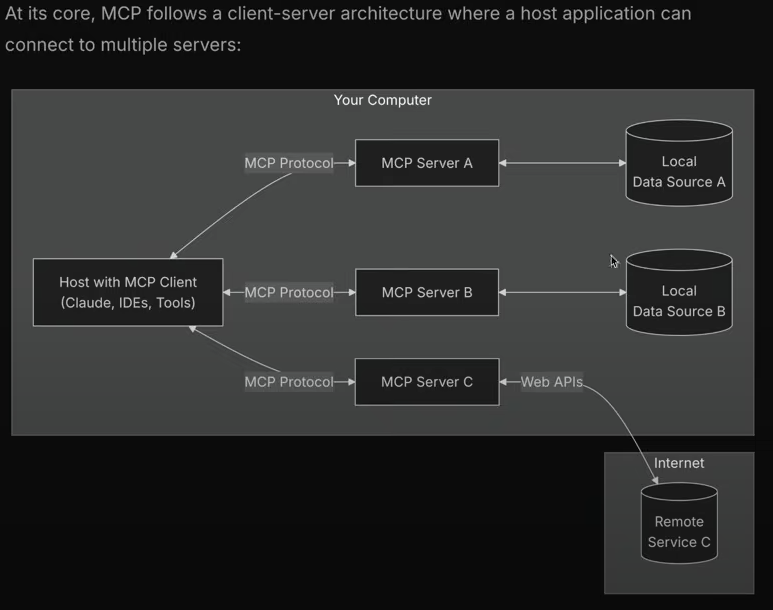
Unlike typical HTTP servers that listen on a port, MCP servers operate over stdio (standard input/output), directly printing to the terminal.
Example Interaction
LLM sends request to MCP server via standard input:
MCP server responds via standard output:
The response can be captured and processed (e.g., using console.log()) so it can be read by the LLM.
Key Components
- MCP Host – The AI application that coordinates and manages one or multiple MCP clients.
- MCP Client – Maintains a connection to an MCP server and obtains context for the MCP host.
- MCP Server – Provides context to MCP clients.
How to create MCP server ?
-
npm install @modelcontextprotocol/sdk -
npm i zod-- for validations of input parameter -
Now create an index.js file :
import { McpServer} from "@modelcontextprotocol/sdk/server/mcp.js";
import { z } from "zod";

// Create an MCP server
const server = new McpServer({
  name: "demo-server",
  version: "1.0.0"
});

async function getWeatherByCity(city='') {
   if (city.toLowerCase()==="Delhi") {
    return {temp: '30C', forecast: 'chances of high rain'};
   }

   return {temp: 'none', error: 'unable to fetch data'};
}

server.registerTool("getWeatherDataByCityName",
  {
    city: z.string(),
  },
  async ({ city }) => {
    return { content: [{ type: 'text', text: JSON.stringify(await getWeatherByCity(city)) }] };
  }
);

// or this city: z.string() instead of this another way is like below:

// Add an addition tool

// server.registerTool("add",
//  {
//    title: "Addition Tool",
//    description: "Add two numbers",
//    inputSchema: { a: z.number(), b: z.number() }
//  },
//  async ({ a, b }) => ({
//    content: [{ type: "text", text: String(a + b) }]
//  })
// );

async init() {
// Start receiving messages on stdin and sending messages on stdout

const transport = new StdioServerTransport();
await server.connect(transport);
}

init();
Transports
The protocol currently defines two standard transport mechanisms for client-server communication:
- stdio, communication over standard in and standard out : particularly useful for local integrations and command line tools.
- Streamable HTTP here the server operates as an independent process that can handle multiple client connections thorugh sse server sent events.
Through sse we can make remote mcp servers like express ones hosted on our doamin which can listen mutiple requests.